This article illustrates a faster and more efficient approach to fetch and parse transactions powered by Shyft’s RPC and API services
Transactions are the core of any blockchain. It describes how users perform actions like transferring tokens, interacting with smart contracts, or minting NFTs. Transactional data is essential for building applications on Solana as it provides real-time insights, enhances security, and drives smart contract functionality.
In this article, we will explore at a smarter way to fetch and parse large volumes of Solana transactions by making parallel API requests. By combining the strengths of Shyft RPCs and Shyft APIs, we’ll show you how to speed up data retrieval and make your processes more efficient.
We have created a working replit here for you to follow along with this article. Feel free to fork it and give it a try.
Before getting started
To get started, we will need a few things.
Register your Shyft account and get your Shyft API key
x-api-key is an authentication parameter, which gives you access to SHYFT APIs. You can get your own API Key & Shyft RPC URL from the Shyft website.
A Development Environment (like NodeJS) to get RPC and API data
For this example, we have used NodeJS, but any other development languages that supports API calls such as C#, Go, Java, Kotlin, Python or PHP can also be used.
Introduction — The Steps involved
Current Solution and Its Limitations: One method for obtaining parsed transactions associated with a specific address is through Shyft’s [transaction/history](https://docs.shyft.to/solana-apis/transactions/transaction-apis#transaction-history) endpoint. However, this endpoint retrieves only 100 parsed transactions at a time, which may not be sufficient for certain applications that want to process larger volumes. Moreover, this endpoint fetches failed transactions as well, making it an impractical solution for an applications who only work with successful transactions.
Get Team Shyft’s stories in your inbox
Join Medium for free to get updates from this writer.
An alternative: In this article, we will explore an alternative method that taps into the combined capabilities of Shyft’s Solana RPCs and Shyft APIs. Instead of calling history endpoint directly on a Solana address, we will break down the process into two steps
- We use Solana’s getSignaturesForAddress RPC method to get transactions signatures for one particular address. We can fetch 1000 transactions signatures at time, starting with the most recent signature at first, then in reverse chronological order.
- Once we have the transaction signatures, we can use Shyft’s new transaction/parse_selected API endpoint to parse the transactions we have received from the RPC call. We will batch the transactions in groups of 100 and process them in parallel, which will make the process considerably faster**.**
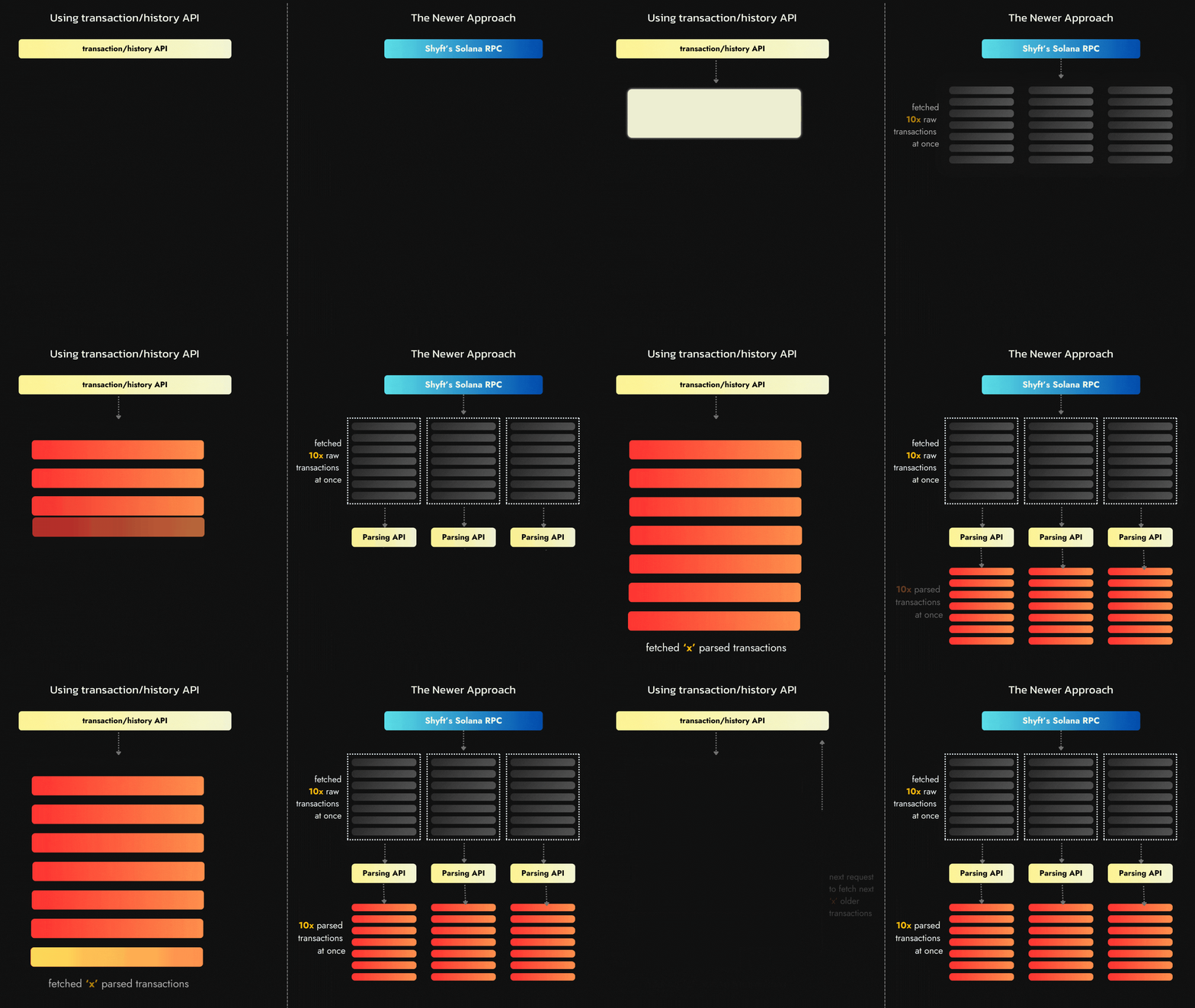
An improved method to fetch transactions in bulk
Excited much? Let’s get started.
Getting Transactions for an Address
The first step involves retrieving transaction signatures associated with the specific address in question. For instance, consider we have a valid Solana address, such as M2mx93ekt1fmXSVkTrUL9xVFHkmME8HTUi5Cyc5aF7K (this could represent a program address, wallet address, or any valid Solana public key). To obtain transactions involving this address, we utilize Solana’s native getSignaturesForAddress RPC call. This task can be performed using Shyft’s RPC URL, which is available in the dashboard, as demonstrated below.
const RPC_URL = `https://rpc.shyft.to?api_key=${YOUR_API_KEY}`;const solanaConn = new Connection(RPC_URL);const transactionAddresses = await solanaConn.getSignaturesForAddress( new PublicKey(address), { limit: 1000, before: before, until: until }, );
The request takes in two major parameters, the Solana address (public key) for which we want to fetch the transactions for, and a configuration object. The configuration object contains the following fields:
- limit: This defines the number of transactions to be returned, with a max limit of 1000 transaction signatures at a time
- before: Transactions are searched and returned backwards in time from this transaction signature. If not provided the search starts from the top of the highest max confirmed block.
- until: Transactions are returned until this transaction signature is found.
In our use-case, only the limit field is applicable as we intent to fetch starting from the most recent transactions. We can also add the before and until fields if we want to fetch all transactions between two particular transactions signatures. The response returned contains an array of transaction signatures, along with a few additional fields.
[ { "err": null, "memo": null, "signature": "5h6xBEauJ3PK6SWCZ1PGjBvj8vDdWG3KpwATGy1ARAXFSDwt8GFXM7W5Ncn16wmqokgpiKRLuS83KUxyZyv2sUYv", "slot": 114, "blockTime": null }, { "err": null, "memo": null, "signature": "CZ1PGjBvj8vDdWG3KpwATGy1ARAXFdWG3KpwATGy1ARAXFSDwt8GFXM7W5Ncn16wmqokgpiKRLuT1ARAXFdWG3Kpw", "slot": 117, "blockTime": null }, { "err": null, "memo": null, "signature": "ARAXFSDwt8GFXM7WZ1PGjBvj8vDdWG3KpwATGy1ARAX6wm1PGjBvj8vDd16wmqoabkgpiKRLuS83WG3KpwATGy1AR", "slot": 121, "blockTime": null } ]
Filtering Transactions
The response returns an array of objects, with each object containing a field named signature, which contains the transaction signature. Another important field for our use case is the err field, which indicates whether there was an error in the confirmed transaction. For transactions without errors, the err field will be null. Since our goal is to work only with confirmed transactions, we filter the results to include only those where the err field is null. The following function is designed to fetch transactions from Solana and filter out any erroneous ones, ensuring that we process only valid, confirmed transactions.
async function getConfirmedTransactionAddresses( address: string,): Promise<string[] | null> { try { const transactionAddresses = await solanaConn.getSignaturesForAddress( new PublicKey(address), { limit: 1000 }, ); return transactionAddresses .filter((transaction) => transaction.err === null) .map((transaction) => transaction.signature); } catch (err) { console.log(err); return null; }}
Parsing Transactions
Once we have the transaction signatures, we are ready to proceed to the next step, which is parsing the transactions. We use Shyft’s newly launched transaction/parse_selected API to accomplish this step. The API endpoint for fetching parsed transactions is
POST https:
Parameters required for this API call
network: specifies the Solana Blockchain environment, which can bedevnet,testnetandmainnet-beta.transaction_signatures: Accepts an array of transaction signatures (as strings) which required to be parsed. A maximum of 100 transactions can be parsed at a time.enable_raw: If set to true, raw transactions will also be returned along with parsed transactions.enable_events: If set to true, anchor events will also be returned along with parsed transactions.
The response received looks somewhat like this
{ "success": true, "message": "Selected transactions fetched successfully", "result": [ { "timestamp": "2024-08-27T12:07:16.000Z", "fee": 0.000015225, "fee_payer": "GveCM9AiRU6VzitwDJN9YTC2fSR2Y6V3qCiDL9C8jU2A", "signers": [ "GveCM9AiRU6VzitwDJN9YTC2fSR2Y6V3qCiDL9C8jU2A", "NTYeYJ1wr4bpM5xo6zx5En44SvJFAd35zTxxNoERYqd" ], "signatures": [ "bM55i8iJmet4vYA4nycm2VdvCghG95xzTRA8PSYN2Y36pmKPygS6PdJTx6rh5vgpZa8psCQMk6iggKQUdhRjtry", "2oGKzJQhA54PzqhxUmBcyJEyVXvbYPMyqaFXZ3FKxoxmsHuVC9M7ogBryTgM1GEHwHPq81QDWeWjrkHzEW3qu1Dv" ], "protocol": { "address": "M2mx93ekt1fmXSVkTrUL9xVFHkmME8HTUi5Cyc5aF7K", "name": "MAGIC_EDEN_V_2" }, "type": "NFT_LIST", "status": "Success", "actions": [ { "info": { "seller": "GveCM9AiRU6VzitwDJN9YTC2fSR2Y6V3qCiDL9C8jU2A", "currency": "So11111111111111111111111111111111111111112", "marketplace": "E8cU1WiRWjanGxmn96ewBgk9vPTcL6AEZ1t6F6fkgUWe", "price": 350000000, "price_raw": 350000000, "nft_address": "7NXYpibm64kH1LFJKi38Qa1wqTSpoQQHEgxkXndaTgKx" }, "source_protocol": { "address": "M2mx93ekt1fmXSVkTrUL9xVFHkmME8HTUi5Cyc5aF7K", "name": "MAGIC_EDEN_V_2" }, "type": "NFT_LIST", "ix_index": 2 } ] }, { "timestamp": "2024-08-27T12:07:06.000Z", "fee": 0.000006076, "fee_payer": "z1M1tedqLceEQGTeuWqTLc6eVLo4qT8Jfo8WGzgGZrB", "signers": [ "z1M1tedqLceEQGTeuWqTLc6eVLo4qT8Jfo8WGzgGZrB" ], "signatures": [ "58R4sbNkkTgtZ4R8JdAqsQ82mtxXCJJ52Jgdz2dbF2c6QVmxi2WN5GFPTPnMMFgfxgiSTTTpBNS4Yf2Q1Kh3w1gc" ], "protocol": { "address": "M2mx93ekt1fmXSVkTrUL9xVFHkmME8HTUi5Cyc5aF7K", "name": "MAGIC_EDEN_V_2" }, "type": "WITHDRAW", "status": "Success", "actions": [ { "info": { "wallet": "z1M1tedqLceEQGTeuWqTLc6eVLo4qT8Jfo8WGzgGZrB", "notary": "NTYeYJ1wr4bpM5xo6zx5En44SvJFAd35zTxxNoERYqd", "escrowPaymentAccount": "BhdjaQoteyByS4S1HSDu8utUe4yyxnAWcwQXFGBr3pFP", "authority": "autMW8SgBkVYeBgqYiTuJZnkvDZMVU2MHJh9Jh7CSQ2", "auctionHouse": "E8cU1WiRWjanGxmn96ewBgk9vPTcL6AEZ1t6F6fkgUWe", "systemProgram": "11111111111111111111111111111111", "escrowPaymentBump": 254, "amount": 120000000000 }, "source_protocol": { "address": "M2mx93ekt1fmXSVkTrUL9xVFHkmME8HTUi5Cyc5aF7K", "name": "MAGIC_EDEN_V_2" }, "type": "WITHDRAW", "ix_index": 2 }, { "info": { "sender": "BhdjaQoteyByS4S1HSDu8utUe4yyxnAWcwQXFGBr3pFP", "receiver": "z1M1tedqLceEQGTeuWqTLc6eVLo4qT8Jfo8WGzgGZrB", "amount": 120, "amount_raw": 120000000000 }, "source_protocol": { "address": "11111111111111111111111111111111", "name": "SYSTEM_PROGRAM" }, "type": "SOL_TRANSFER", "parent_protocol": "M2mx93ekt1fmXSVkTrUL9xVFHkmME8HTUi5Cyc5aF7K", "ix_index": 3 } ] } ]}
Shyft’s [transaction/history](https://docs.shyft.to/solana-apis/transactions/transaction-apis#transaction-history) API has been effective, but it comes with certain limitations, such as the ability to retrieve only 100 parsed transactions at a time and the inclusion of failed transactions, which may not be relevant for all users. This new alternative allows for the retrieval of up to 1,000 transactions at once, with parsing done in batches of 100. While this approach may appear similar to the previous transaction/history endpoint, it offers significant advantages when using Shyft’s higher-tier plans, which allow for more requests per second. When using the transactions/history endpoint, we had to wait for the API to fetch 100 transactions before requesting the next batch of 100 older transactions. However, the newer approach allows us to retrieve up to 1,000 transactions at once using Shyft RPCs and parse them in batches of 100 transactions parallel using Shyft’s transactions/parsed API, significantly speeding up the process. Additionally, since we filter out erroneous transactions after retrieving them from the RPC, the final results exclude failed transactions, making this approach a superior alternative to the previous method.
Press enter or click to view image in full size
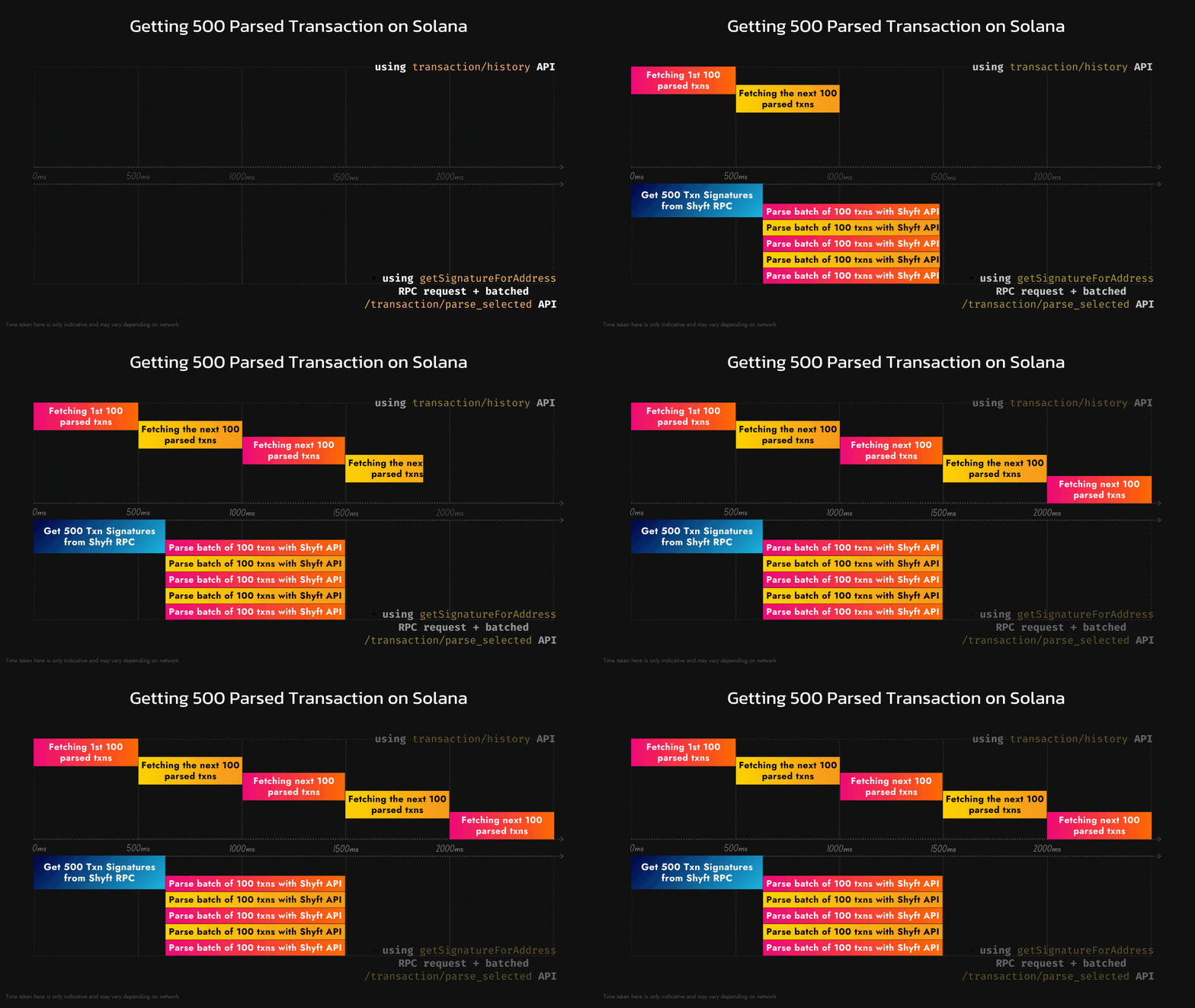
Comparison of two methods for fetching transactions in bulk
If you liked this article, feel free to read our other articles on Streaming Moonshot transactions with gRPC or on Real-time data streaming with gRPC. We hope you have a great time building with Shyft.
If you want to follow along with this blog, feel free to fork this replit and give it a try.