We will fetch all NFTs from a Solana wallet and group them by collection.
An NFT collection is a group of related digital assets containing a limited number of individual NFTs. NFT collections consist of a number of NFTs that all have the same artistic style, with minor variations in design and attributes. Under the hood, all NFT collections are also NFTs, with their max supply being equal to zero. This means, collections are in fact one-of-a-kind NFTs, and they too have unique addresses(mint addresses) like other NFTs. The mint address in case of collections is referred to as the collection address(or collections ids).
One example of NFT collections would be DeGods NFTs. This is one of the most popular Solana-based NFT collections, made up of 10,000 deflationary PFP NFTs.
In this sample project tutorial, we will see how we can fetch the NFT collections and their details from a specific wallet.
Read SHYFT Documentation here.
Before getting started
We will need a few things to get started on our journey.
Authentication: Get your Shyft API key
x-api-key is an authorization parameter, which gives you access to SHYFT APIs. You can get your own API Key from the SHYFT website. Just signup with your email id here and you can get it for free.
We will use React to develop this project but you can choose any language of your choice. As we are using react we will need Node.js installed on our computer. You can download node.js from here.
Steps Involved
In this blog, we attempt to get all the NFTs from a wallet and group them according to the collection they belong to. This involves 3 steps,
- getting all NFTs from a wallet
- classifying them according to their collection, and
- getting collection details
However, SHYFT provides a single API to perform all these steps at once.
Getting Collections from a wallet
We will be using the collections API endpoint to fetch all the collections from a wallet Using which we can create a mapping of which NFT belongs to which collection.
GET https://api.shyft.to/sol/v1/wallet/collections?network=mainnet-beta&wallet_address=YOUR_WALLET_IDThis API accepts x-api-key parameter in the header, which is an authorization parameter used by SHYFT for validating its users. You can get your own **x-api-key** from the SHYFT website for free here.
This API takes in 2 parameters:
network: Selects the Solana Blockchain network instance, which can be devnet, testnet and mainnet-betawallet_address: Accepts the user’s public wallet address.
Once successfully executed, the response should be somewhat like this. For details on our APIs or to try them out live, checkout out swagger UI here.
{
  "success": true,
  "message": "All NFT collections",
  "result": {
    "collections": [
      {
        "address": "AUjEKtRBa9Y75YUTF2dzjMsSZTA5KqvRuoLEYRVv2f5B",
        "name": "Daisuki",
        "family": null,
        "nft_count": 3,
        "nfts": [
          {
            "name": "Daisuki",
            "symbol": "DSK",
            "royalty": 5,
            "mint": "E8e1VYWz5NKQ6FMXFCM21jKFw3GEuZrUR1XYLWpn7XwJ",
            "update_authority": "NUKETUC5Qzy9do5kFQMfCizcYetV8dLWkoxMMmbQkAn",
            "metadata_uri": "https://shdw-drive.genesysgo.net/42rF6QTTVKkQrEz1Yz5XJCYStSCyLGzLonULXGMbVx3Y/3157.json",
            "creators": [
              {
                "address": "HhtLVvm3LkLnFvTnpcopdiMEYbsefa6oicqGNz91w4cx",
                "share": 0,
                "verified": true
              },
              {
                "address": "BrB9WYjJ3BgeWvbK1ntstd1K4KJRvnabT4rpsbLKsKYE",
                "share": 100,
                "verified": false
              }
            ]
          },
          //......Trimmed Down JSON
            ]
          }
        ]
      },
      {
        "address": "84g56pUNqJd3rrXt24FrA4U3nRbmusEHYaoTzBThgGfQ",
        "name": "RIOT Elements #1",
        "family": null,
        "nft_count": 4,
        "nfts": [
          {
            "name": "RIOT Elements #84",
            "symbol": "ELMNT",
            "royalty": 10,
            "mint": "6a3YVEvk1fBFrWrQLEFdQKHNzggest5qYieM6BxEVqPo",
            "update_authority": "FSHP7g2kz3Mhy4oQ3w8JYksPR487hMgkcrjYAdjzwtaE",
            "metadata_uri": "https://ipfs.io/ipfs/bafybeiebuwbgvdk4uy6oqqioj3b4jbdiwd3b6pzgg6rfbqiojplm4og5vq/83.json",
            "creators": [
              {
                "address": "DF9c5FAZ6R5LrURVeHBgYA4fYpRkpVdaDewjE21vzdUe",
                "share": 0,
                "verified": true
              },
              {
                "address": "6YZnqWHPLrzasB9BJaBXYjRFSDfSobHXDhWUdUwV2iwU",
                "share": 100,
                "verified": false
              }
            ]
          }, //......Trimmed Down JSON
          {
            "name": "RIOT Elements #166",
            "symbol": "ELMNT",
            "royalty": 10,
            "mint": "9NE6TPZaZkFC5ZwTLUt4o4ehjEzw28CxWzfzNMvLcVz2",
            "update_authority": "FSHP7g2kz3Mhy4oQ3w8JYksPR487hMgkcrjYAdjzwtaE",
            "metadata_uri": "https://ipfs.io/ipfs/bafybeiebuwbgvdk4uy6oqqioj3b4jbdiwd3b6pzgg6rfbqiojplm4og5vq/165.json",
            "creators": [
              {
                "address": "DF9c5FAZ6R5LrURVeHBgYA4fYpRkpVdaDewjE21vzdUe",
                "share": 0,
                "verified": true
              },
              {
                "address": "6YZnqWHPLrzasB9BJaBXYjRFSDfSobHXDhWUdUwV2iwU",
                "share": 100,
                "verified": false
              }
            ]
          }
        ]
      },
      //...trimmed down JSON
            ]
          }
        ]
      }
    ]
  }
}
Please note that the JSON response has been manually trimmed down for a readable result. You can check out the full detailed response on our dev doc here.
This collections field returned in the response will contain an array of all the collections present in the wallet whose wallet_address is specified as the parameters of the API call, and the nfts field will specify the NFTs in the wallet that belongs to that particular collection.
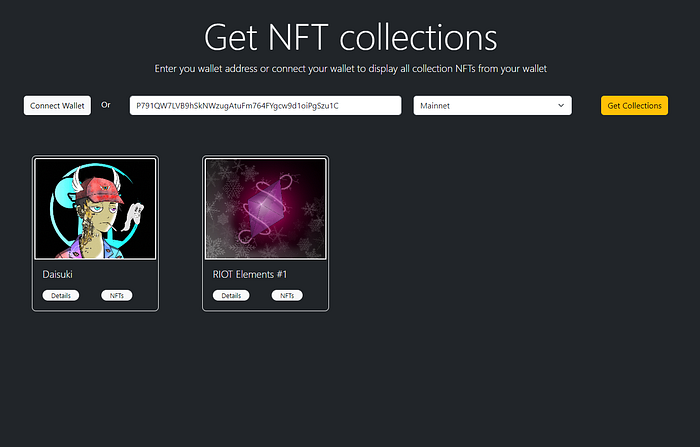
NFT collections in a wallet.
So that’s pretty much everything about this blog, where we see how we can fetch NFT collections and collection details from a particular user’s wallet. If you enjoyed this blog, feel free to check out our other blogs on how to create and maintain a membership service using NFTs on Solana, or building an NFT gated dApp.
We hope you have a great time building dApps with SHYFT APIs. Happy Hacking.
Resources
Join our Discord