A step-by-step guide to detect and stream newly minted Pump.fun tokens on Solana in real-time using Shyft’s Yellowstone gRPC
Pump.fun launches hundreds of new tokens every hour on Solana. For trading bots, snipers, and analytics tools, detecting these launches the moment they hit the blockchain is critical. Once a token graduates to PumpSwap, you’ll also want to stream and parse PumpSwap AMM transactions to track live trading activity.
In this guide, you’ll learn how to:
- Subscribe to the Pump.fun program ID (6EF8rrecthR5Dkzon8Nwu78hRvfCKubJ14M5uBEwF6P) using Shyft’s Yellowstone gRPC
- Filter transactions to detect only new token mints using MintTo log messages
- Fetch token name, symbol, supply and mint address using Shyft’s Token API
All examples use TypeScript with the @triton-one/yellowstone-grpc client
What You Need Before Getting Started
Get Your Shyft API Key, gRPC endpoint and gRPC token
Signup and get all the above details in Shyft Dashboard. This also includes a free Shyft API key and RPC URL.
A server-side backend (like NodeJS) to receive gRPC data
In this example, we used NodeJS, but other backend languages such as C#, Go, Java, Kotlin, Python, or PHP can also be used.
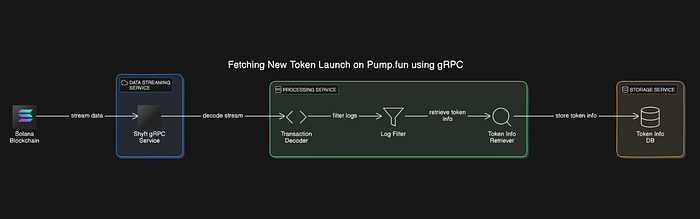
How This Token Launch Detector Works
- Solana blockchain data is streamed through Shyft’s gRPC service.
- The received data is then decoded, filtered by log messages to identify new token mints
- The data is enriched with token metadata, and then stored in a database.
How to Connect to Shyft’s Yellowstone gRPC
To begin streaming, we need to establish the client service. This requires: the gRPC URL and the gRPC Access Token.
const client = new Client(
    'Your Region specific Shyft gRPC URL',
    'Shyft gRPC Access Token',
    undefined,
  );
Now, let’s dive in and grab that data from the blockchain!
For production token snipers, make sure your stream never drops — pair this with gRPC reconnect and slot replay to resume from the exact slot where you left off.
How to Subscribe to Pump.fun Transactions by Program ID
The Pump.fun Program Id
The Pump.fun program ID is 6EF8rrecthR5Dkzon8Nwu78hRvfCKubJ14M5uBEwF6P.
Requesting the Stream and getting Live data
The following code demonstrates how to establish a subscription to a live data stream from the gRPC service. Specifically, we subscribe to transactions associated with the Pump.fun program ID.
const req = {
    accounts: {},
    slots: {},
    transactions: {
      bondingCurve: {
        vote: false,
        failed: false,
        signature: undefined,
        accountInclude: ['6EF8rrecthR5Dkzon8Nwu78hRvfCKubJ14M5uBEwF6P'], //Address 6EF8rrecthR5Dkzon8Nwu78hRvfCKubJ14M5uBEwF6P
        accountExclude: [],
        accountRequired: [],
      },
    },
    transactionsStatus: {},
    entry: {},
    blocks: {},
    blocksMeta: {},
    accountsDataSlice: [],
    ping: undefined,
    commitment: CommitmentLevel.CONFIRMED, //for receiving confirmed txn updates
  };
  subscribeCommand(client, req);
Output will look like:
filters: [ 'Pumpfun' ],
account: undefined,
slot: undefined,
transaction: {
transaction: {
signature: <Buffer 48 e8 a9 27 ba af 8d a7 34 10 83 b8 57 6f 9c d0 e2 31 67 fe 33 c7 94 44 64 de 88 67 d1 9a ff 69 77 e6 6b f4 0b ec e0 48 19 5d a0 0f ef 7e aa b9 c4 af ... 14 more bytes>,
isVote: false,
transaction: [Object],
meta: [Object],
index: '1690'
},
slot: '288764368'
},
block: undefined,
ping: undefined,
pong: undefined,
blockMeta: undefined,
entry: undefined
}
To get new token launch Tx, we need to decode and streamline our stream output. In the utils folder, you will find the transactionOutput.ts file. The following code illustrates how to modify the output to meet our needs:
//fromtransactionOutput.ts
import { decodeTransact } from "./decodeTransaction";
export function tOutPut(data){
const dataTx = data?.transaction?.transaction
const signature = data != undefined?decodeTransact(dataTx?.signature):"";
const message = dataTx?.transaction?.message
const header = message?.header;
const accountKeys = data != undefined?message?.accountKeys?.map((t)=>{
return decodeTransact(t)
}):"";
const recentBlockhash = decodeTransact(message?.recentBlockhash);
const instructions = message?.instructions
const meta = dataTx?.meta
const logs : any[] = meta?.logMessages;
const logFilter = logs?.some(instruction =>
instruction.match(instruction.match(/MintTo/i)));
return {
signature,
message:{
header,
accountKeys,
recentBlockhash,
instructions
},
meta,
logFilter
}
}
Output will look like:
{
  signature: '2mHnosZrcuDPB7PoB5CLS69qW4AA5SfZWkrn4ZPyGpQyQjQG2fZPGAnb28RmTwLeAW4wq4ZMj4oLgrgsWvW4zQbc',
  message: {
    header: {
      numRequiredSignatures: 2,
      numReadonlySignedAccounts: 0,
      numReadonlyUnsignedAccounts: 10
    },
    accountKeys: [
      '89qbZTVyGqpfeu5btKubFqYjV9mh4w3zWDGacKkFpMPj',
      '8MqEGUhijWXbDuzoJR4Zax37HLTpJQZXNfcH81CWpump',
      'HFqU5x63VTqvQss8hp11i4wVV8bD44PvwucfZ2bU7gRe',
     ],
    recentBlockhash: '5upunMbFnmYLm2dq8tEDgHoW3yMBqsLQg7UwTBjWFysa',
    instructions: [ [Object], [Object], [Object], [Object], [Object], [Object] ]
  },
  meta: {
    err: undefined,
    fee: '90719',
    preBalances: [
      '6868763480', '0',
      '1432215',    '0',
      '0',          '0',
      '0',          '320032236232075',
      '1',          '1',
      '1141440',    '323296939',
      '5530000',    '1141440',
      '934087680',  '731913600',
      '1009200',    '0'
    ],
    postBalances: [
      '5832283961', '1461600',
      '5432215',    '1001231920',
      '2039280',    '15616720',
      '2039280',    '320032246232075',
      '1',          '1',
      '1141440',    '323296939',
      '5530000',    '1141440',
      '934087680',  '731913600',
      '1009200',    '0'
    ],
    innerInstructions: [ [Object], [Object], [Object] ],
    innerInstructionsNone: false,
    logMessages: [
      'Program ComputeBudget111111111111111111111111111111 invoke [1]',
      'Program ComputeBudget111111111111111111111111111111 success',
      'Program 11111111111111111111111111111111 invoke [1]',
      'Program 11111111111111111111111111111111 success',
      'Program ComputeBudget111111111111111111111111111111 invoke [1]',
      'Program ComputeBudget111111111111111111111111111111 success',
      'Program 6EF8rrecthR5Dkzon8Nwu78hRvfCKubJ14M5uBEwF6P invoke [1]',
      'Program log: Instruction: Create',
      'Program 11111111111111111111111111111111 invoke [2]',
      'Program 11111111111111111111111111111111 success',
      'Program TokenkegQfeZyiNwAJbNbGKPFXCWuBvf9Ss623VQ5DA invoke [2]',
      'Program log: Instruction: InitializeMint2',
      'Program TokenkegQfeZyiNwAJbNbGKPFXCWuBvf9Ss623VQ5DA consumed 2780 of 238053 compute units',
      'Program TokenkegQfeZyiNwAJbNbGKPFXCWuBvf9Ss623VQ5DA success',
      'Program 11111111111111111111111111111111 invoke [2]',
      'Program 11111111111111111111111111111111 success',
      'Program ATokenGPvbdGVxr1b2hvZbsiqW5xWH25efTNsLJA8knL invoke [2]',

    ],
    logMessagesNone: false,
    preTokenBalances: [],
    postTokenBalances: [ [Object], [Object] ],
    rewards: [],
    loadedWritableAddresses: [],
    loadedReadonlyAddresses: [],
    returnData: undefined,
    returnDataNone: true,
    computeUnitsConsumed: '173923'
  },
  logFilter: true
}
To get new token launches, we filter the log messages to find transactions that include the term "MintTo" in their logs. This helps us identify and return only the transactions related to token minting.
How to Fetch Token Name, Symbol and Mint Address
Before getting the result, we need basic info about the token, like its name, symbol, description, decimals, and supply. The code below shows how to fetch this using Shyft’s getInfo API.
var myHeaders = new Headers();
const api = 'Your api key'
myHeaders.append("x-api-key", api);
var requestOptions:any = {
  method: 'GET',
  headers: myHeaders,
  redirect: 'follow'
};
export async function getTokenInfo(token){
 const info = await fetch(`https://api.shyft.to/sol/v1/token/get_info?network=mainnet-beta&token_address=${token}`, requestOptions)
 const infoJson = await info.json();
 const name = infoJson.result.name;
 const symbol = infoJson.result.symbol;
 const desc = infoJson.result.description;
 const decimal = infoJson.result.decimals;
 const supply = infoJson.result.current_supply;
  return{
    name,
    symbol,
    desc,
    supply,
    decimal
  }
}
We return the token information as an object and then export our function so that it can be called by other functions.
Code Breakdown
const result = await tOutPut(data);: Passes the incomingdatato thetOutPutfunction, which processes the data and returns a promise. The result of this promise is awaited and stored in theresultvariable.result?.logFilter == true: Checks ifresultis notnullorundefinedand if itslogFilterproperty istrue. This indicates that the log message matches the criteria (e.g., contains"MintTo").const tokenStream = result?.meta?.postTokenBalances[0];: Retrieves the first token balance entry from thepostTokenBalancesarray in themetaproperty ofresult.const mint = tokenStream?.mint;: Extracts the mint address of the token fromtokenStream.const tokenInfo = await getTokenInfo(mint);: Calls thegetTokenInfofunction with the mint address to fetch detailed information about the token. This function returns a promise that is awaited, with the resulting token information stored intokenInfo.
stream.on("data", async (data) => {
      try{
     const result = await tOutPut(data);
     if(result?.logFilter == true){
         const tokenStream = result?.meta?.postTokenBalances[0];
         const mint = tokenStream?.mint
         const tokenInfo = await getTokenInfo(mint);
         console.log(`
           CA| ${mint}
           Name| ${tokenInfo?.name}
           Symbol| ${tokenInfo?.symbol}
           Desc| ${tokenInfo?.desc}
           Decimal| ${tokenInfo?.decimal}
           Supply| ${tokenInfo?.supply}
           <https://solscan/tx/${result.signature}>
          `)
      }
  }catch(error){
    if(error){
      console.log(error)
    }
  }
Logging Token Information
CA: The mint address of the token.Name: The name of the token.Symbol: The symbol of the token.Desc: The description of the token.Decimal: The number of decimal places the token supports.Supply: The current supply of the token.Transaction Link: A URL to view the transaction on Solscan, with the transaction signature included.
console.log(`
  CA| ${mint}
  Name| ${tokenInfo?.name}
  Symbol| ${tokenInfo?.symbol}
  Desc| ${tokenInfo?.desc}
  Decimal| ${tokenInfo?.decimal}
  Supply| ${tokenInfo?.supply}
  <https://solscan/tx/${result.signature}>
`);
Our Result should look like this
 CA| 4hhRRFQ4MS8jmzjeVdvAk66zxKU3ARTaherKwYfkpump
  Name| FLOSS
  Symbol| FLOSS
  Desc| Don't forget to FLOSS.
  Decimal| 6
  Supply| 1000000000
  https://solscan/tx/2pbXSouh76bS4aAwXfrCSYtGdDuKcCTcRmuvKDJWrR9UkibUNjRooSFE9qS1jvtpHxpp3EZj8itK9G59VTMjgGUT


  CA| CEfDZRT4X7sX5Q1BqeK7KeqvLtCZc1Jmr1GdTQ6Kpump
  Name| Bro said he knew a spot
  Symbol| SPOT
  Desc| Bro said he knew a spot
  Decimal| 6
  Supply| 1000000000
  https://solscan/tx/3ncnJNsApRX21hbT9rSN7qtty5bj3czBj63bFkJsCg1Wa4Bu7wJ4PUryZREFvqvPPD1PXGboHyRFXNvUz4tzttF2
Building a Real-Time Pump.fun Token Launch Detector
In this article, you’ve learned to set up a real-time stream for tracking newly launched tokens on Pumpfun using gRPC. By leveraging gRPC, you’ve overcome the limitations of on-chain data tracking and can now receive live transaction data with milliseconds latency.
This setup allows you to stay ahead of token launches and access detailed token information using Shyft’s gRPC
For additional support, join our Discord Server or follow us on Twitter for the latest updates. Our team is here to assist you in utilizing this innovative technology.
You can find all the code related to this article on our GitHub repository. You can clone it and use it to build innovative solutions.
Need to detect token launches even before they’re confirmed? RabbitStream streams directly from Solana shreds — giving you 15–100ms earlier detection than standard Yellowstone gRPC.