A complete beginner’s guide to setting up Shyft’s Yellowstone gRPC client, subscribing to transactions, and parsing real-time Solana data — with TypeScript examples for Pump.fun and Raydium
Solana processes thousands of transactions per second. For trading bots, analytics tools, and real-time dashboards, polling the RPC for updates introduces delays that cost you performance and opportunities. Shyft’s Yellowstone gRPC service — powered by Dragon’s Mouth geyser nodes — gives you a persistent, filtered stream of Solana transactions, account updates, blocks, and slots as they happen on-chain. In this guide, you’ll learn how to:
- Install and initialize the
@triton-one/yellowstone-grpcTypeScript client - Set up a filtered SubscribeRequest for any Solana program
- Handle and parse the raw gRPC stream using Shyft’s transaction formatter
- Add a reconnect mechanism for production reliability
We’ll use Pump.fun (6EF8rrecthR5Dkzon8Nwu78hRvfCKubJ14M5uBEwF6P) as the example program, but this works for any program on Solana.
We have created a few replit examples which illustrates gRPC streaming with Shyft, feel free to fork them incase you want to follow along —
- Replit Example for Streaming Radiumv4 transactions on Solana.
- Replit Example for Streaming pump.fun transactions on Solana.
NOTE: Don’t forget to add the gRPC url and access token in the secrets section. Please refer to the ‘Before Getting Started’ section for more details.
Why use gRPC Instead of Solana RPC WebSockets?
| RPC Websockets | Yellowstone gRPCs | |
| Filtering | Limited | Fine-grained by account, program, commitment |
| Latency | Higher | Lower — direct from validator |
| Reliability | Drops under load, and has frequent disconnections | Persistent stream with reconnect |
| Best for | Simple use cases | Production bots, HFT, indexers |
What You Need Before Getting Started
To get started, we will need a few things.
Authentication: Your Shyft API Key, gRPC endpoint and gRPC token
You can get your free Shyft API Key(an auth parameter used by Shyft) from the Shyft Website. You can also find your Solana region-specific gRPC endpoint and access token on your Shyft Dashboard.
A server-side backend (like NodeJS) to receive gRPC data
As gRPC services are unsupported in web-browsers, you would need a backend application to receive gRPC data. For this example, we have used NodeJS, but any other backend server side languages such as C#, Go, Java, Kotlin, Python or PHP can also be used.
How Shyft’s Yellowstone gRPC Streaming Works
While this blog explores the broader applications of gRPC streaming for real-time transactions on Solana, let’s use pump.fun as a specific example. Here, we’ll demonstrate how to set up a gRPC stream to receive real-time updates on pump.fun transactions. However they can be used on any programs as per your applications requirement.
Behind the scenes, Geyser plugins act as data bridges between the Solana network and your dApp. They capture all the crucial details like accounts, blocks, and most importantly, transactions. Shyft’s Geyser-fed gRPC service leverages these plugins to provide a continuous stream of this information, ensuring you’re always in the know about what’s happening on the program you are setting up a stream for. Setting up a stream however requires a few steps:
- Getting a region specific gRPC URL and Access Token
- Initializing the gRPC Client for receiving transactions
- Requesting the Stream and getting Live data
- Handling and processing the data received
Step 1: Install and Initialize the Yellowstone gRPC Client
Getting a gRPC url & access token from Shyft
Shyft’s region-specific gRPC url is available in the dashboard and access tokens are available in their discord server. Please refer to the ‘Before Getting Started’ section for more details.
Initializing a gRPC client
Shyft provides Dragon’s Mouth gRPC nodes, initially developed by Triton as a part of their project yellowstone. It has a lot of pre-built client libraries in various languages to interact with the gRPC interface. Some of the supported languages and their clients:
- Rust: Available at Triton GitHub — Rust Client Example
- Golang: Available at Triton GitHub — Go Client Example
- NodeJS/Typescript: Available at @triton-one/yellowstone-grpc — Socket
For this article we have used the NodeJS client, but can choose any client as per your requirement. First, we proceed by installing the NodeJS client in our project, by using the following command:
npm install --save @triton-one/yellowstone-grpc

yarn add @triton-one/yellowstone-grpc
Once we have the NodeJS client Library installed, we can now initialize the client. We simply have to import ‘Client’ class from the @triton SDK. The constructor for the Client class takes in two compulsory parameters, first the Shyft gRPC endpoint, and the gRPC access token, which were already obtained in the previous step.
A gRPC client can be initialized in the following manner:
import Client from "@triton-one/yellowstone-grpc";

const client = new Client(
  "<https://grpc.us.shyft.to>", //Your Region specific Shyft gRPC URL
  "hbdj-asjnf-access-token-asdh", //Shyft gRPC Access Token
  undefined,
);
Once we have initialized the client, we can now call any of the client methods. Please note that the client operates asynchronously, so all calls should be executed within an async block or async function.
Step 2: Create a SubscribeRequest for Any Solana Program
The key to receiving real-time updates from gRPC is through subscription streams. Shyft gRPCs allow you to subscribe to specific data streams using the subscribe() method. This method returns a stream object that emits updates as soon as they occur on-chain.
const stream = await client.subscribe();Once we have the subscription stream created, we can send a subscribe request to Shyft’s gRPC interface in order receive specific updates streamed to our backend server. Shyft’s gRPC service can deliver a variety of updates, including account changes, transactions, new blocks, and even slot updates. But to avoid information overload, you need to specify what you actually need, for which there are different types of subscribe requests, each with its own set of parameters. Subscribe requests on gRPC look somewhat like this.
import { CommitmentLevel } from "@triton-one/yellowstone-grpc";

const req: SubscribeRequest = {
  accounts: {},
  slots: {},
  transactions: {},
  transactionsStatus: {},
  entry: {},
  blocks: {},
  blocksMeta: {},
  accountsDataSlice: [],
  ping: undefined,
  commitment: CommitmentLevel.CONFIRMED,
};
Most of the request parameters are self-explanatory, working exactly with what they are named,
- ‘accounts’: You can subscribe to specific accounts (e.g., SOL-USDC OpenBook) by specifying this parameter and receive updates based on commitment levels (processed, confirmed, finalized).
- ‘accountDataSlice’: This field helps you to filter your gRPC stream, so that you receive only the relevant portion of streamed data. For example you are streaming accounts, for which the data size is 200bytes, but you only need 40 bytes after a certain offset. This field can help you filter those 40 bytes for every update in the stream.
- ‘transactions’ & ‘transactionsStatus’: You can receive updates on all transactions or filter them based on specific criteria (vote/failed transactions, including/excluding accounts). Programs can also be monitored using this.
- ‘slots’, ‘blocks’ & ‘blocksMeta’ : Stay informed about new blocks and slots being produced on the blockchain.
- ‘commitment’: This specifies the commit level for any update, either processed, confirmed or finalized.
Here is a sample subscription request to receive transactions:
const req = {
  accounts: {},
  slots: {},
  transactions: {
    pumpFun: {
      vote: false,
      failed: false,
      signature: undefined,
      accountInclude: [PUMP_FUN_PROGRAM_ID.toBase58()], //Address 6EF8rrecthR5Dkzon8Nwu78hRvfCKubJ14M5uBEwF6P
      accountExclude: [],
      accountRequired: [],
    },
  },
  transactionsStatus: {},
  entry: {},
  blocks: {},
  blocksMeta: {},
  accountsDataSlice: [],
  ping: undefined,
  commitment: CommitmentLevel.CONFIRMED, //for receiving confirmed txn updates
};
For streaming transactions in real-time, we use the transactions parameter. You can also set a custom tag with pumpFun (think of it like a nickname for your data stream). The vote and failed fields let you choose whether to see successful transactions only (vote = true) or include failed ones (failed = true). accountInclude parameter accepts a set of accounts (any solana address), and sends you transactions in which mentioned accounts were involved, which in our case is the program address(of a particular program, say to detecting new pump.fun token launches). Finally, the commitment field defines the level of confirmation you desire for transactions: processed (like a draft), confirmed (more reliable), or finalized (most reliable, but might take a bit longer). Remember, leaving all fields empty will broadcast all transactions. Otherwise, these fields work together like a logical AND, and values in arrays function like a logical OR.
Step 3: Dynamically Modify or Stop Your Subscription
- Modifying Subscriptions: The subscription stream allows bi-directional communication. You can update your subscription filters dynamically by sending a new request string.
- Unsubscribing: To stop receiving updates on all streams, send an empty subscription request. This will keep the connection open for future subscriptions.
One of the most powerful features of Yellowstone gRPC is that you can update your SubscribeRequest without disconnecting the stream — no reconnection overhead, no missed events.
With the stream successfully set up, it is necessary to have a function to process the transactions received for further actions. The stream.on('data', callbackFunc()) method facilitates handling the stream, as illustrated below.
//callback function that handles the stream
stream.on("data", (data) => {
    if (data?.transaction) {
      const txn = TXN_FORMATTER.formTransactionFromJson(
        data.transaction,
        Date.now(),
      ); //utility function
      const parsedTxn = decodePumpFunTxn(txn);
      //decoding the pump.fun transaction with SHYFT txn parser
      if (!parsedTxn) return;
        console.log(
          new Date(),
          ":",
          `New transaction <https://translator.shyft.to/tx/${txn.transaction.signatures[0]}> \\n`,
          JSON.stringify(parsedTxn, null, 2) + "\\n",
        ); //displaying the received transaction
      }
  });
Step 4: Add a Reconnect Mechanism for Production
While gRPC streaming offers a reliable way to receive real-time data, unexpected network issues can still disrupt the connection. To ensure a seamless experience, you can implement a reconnect mechanism in your application. Here is an example mechanism will automatically attempt to re-establish the gRPC stream if it gets disconnected.
async function subscribeCommand(client: Client, args: SubscribeRequest) {
  while (true) {
    try {
      await handleStream(client, args); //function which handles the stream
    } catch (error) {
	    //iff the stream disconnects due to any error, this will wait for a second and restart the stream
      console.error("Stream error, restarting in 1 second...", error);
      await new Promise((resolve) => setTimeout(resolve, 1000));
    }
  }
}
For production applications, implement gRPC reconnect and slot replay to resume from the exact slot where a disconnection occurred.
Step 5: Parse Raw gRPC Transactions with Shyft’s Formatter
Thus we have seen, how we can seamlessly stream Solana transactions in real-time by leveraging Shyft’s gRPC services. Here is a raw transaction received from the gRPC:
{
  filters: [ 'pumpFun' ],
  account: undefined,
  slot: undefined,
  transaction: {
    transaction: {
      signature: Buffer(64) [Uint8Array] [
        187,  60,  62,  68, 161, 246, 245, 181,   4,  69, 154.....
      ],
      isVote: false,
      transaction: {
        signatures: [
          Buffer(64) [Uint8Array] [
            187,  60,  62,  68, 161, 246, 245, 181,   4,  69, 154...
          ]
        ],
        message: {
          header: {
            numRequiredSignatures: 1,
            numReadonlySignedAccounts: 0,
            numReadonlyUnsignedAccounts: 9
          },
          accountKeys: [
            Buffer(32) [Uint8Array] [
              223,  88, 182,  18, 209,  53, 153, 11.....
            ]
          ],
          recentBlockhash: Buffer(32) [Uint8Array] [
            163,  84, 237, 169, 198,  24,  25, 131.....
          ],
          instructions: [
            {
              programIdIndex: 14,
              accounts: Uint8Array(0) [],
              data: Buffer(9) [Uint8Array] [
                3, 64, 66, 15, 0,
                0,  0,  0,  0
              ]
            },
            {
              programIdIndex: 15,
              accounts: Buffer(2) [Uint8Array] [ 0, 1 ],
              data: Buffer(124) [Uint8Array] [
                  3,   0,   0,   0, 223,  88, 182,  18, 209,  53, 153,  11,
                 ......
              ]
            },
            {
              programIdIndex: 16,
              accounts: Buffer(4) [Uint8Array] [ 1, 17, 0, 18 ],
              data: Buffer(1) [Uint8Array] [ 1 ]
            },
            {
              programIdIndex: 19,
              accounts: Buffer(18) [Uint8Array] [
                16, 2, 20, 3,  4,  5,  6,
                21, 7,  8, 9, 10, 11, 12,
                22, 1, 13, 0
              ],
              data: Buffer(17) [Uint8Array] [
                9, 184, 98, 141, 47,   0, 0,
                0,   0, 79,  50, 51, 244, 1,
                0,   0,  0
              ]
            },
            {
              programIdIndex: 16,
              accounts: Buffer(3) [Uint8Array] [ 1, 0, 0 ],
              data: Buffer(1) [Uint8Array] [ 9 ]
            }
          ],
          versioned: true,
          addressTableLookups: []
        }
      },
      meta: {
        err: undefined,
        fee: '805000',
        preBalances: [
          '116096294303',  '0',
          '6124800',       '23357760',
          '16258560',      '2039280',
          '7554878430798', '3591360',
          '101977920',     '101977920',
          '79594560',      '2039280',
          '2039280',       '2039280',
          '1',             '1',
          '934087680',     '583216369927',
          '1009200',       '1141440',
          '4224577002',    '1141440',
          '0'
        ],
        postBalances: [
          '115297694303',  '0',
          '6124800',       '23357760',
          '16258560',      '2039280',
          '7555676225798', '3591360',
          '101977920',     '101977920',
          '79594560',      '2039280',
          '2039280',       '2039280',
          '1',             '1',
          '934087680',     '583216369927',
          '1009200',       '1141440',
          '4224577002',    '1141440',
          '0'
        ],
        innerInstructions: [
          {
            index: 3,
            instructions: [
              {
                programIdIndex: 16,
                accounts: Buffer(3) [Uint8Array] [ 1, 6, 0 ],
                data: Buffer(9) [Uint8Array] [
                  3, 184, 98, 141, 47,
                  0,   0,  0,   0
                ],
                stackHeight: 2
              },
              {
                programIdIndex: 16,
                accounts: Buffer(3) [Uint8Array] [ 5, 13, 20 ],
                data: Buffer(9) [Uint8Array] [
                  3, 96, 181, 51, 249,
                  1,  0,   0,  0
                ],
                stackHeight: 2
              }
            ]
          }
        ],
        innerInstructionsNone: false,
        logMessages: [
          'Program ComputeBudget111111111111111111111111111111 invoke [1]',
          'Program ComputeBudget111111111111111111111111111111 success'
          //shortend
        ],
        logMessagesNone: false,
        preTokenBalances: [
          {
            accountIndex: 5,
            mint: 'G2JNEiqhWunMnDGxGxgPYppWiCiovqKezS6XBgjiinP6',
            uiTokenAmount: {
              uiAmount: 80473675.722615,
              decimals: 6,
              amount: '80473675722615',
              uiAmountString: '80473675.722615'
            },
            owner: '5Q544fKrFoe6tsEbD7S8EmxGTJYAKtTVhAW5Q5pge4j1',
            programId: 'TokenkegQfeZyiNwAJbNbGKPFXCWuBvf9Ss623VQ5DA'
          } //shortened
        ],
        postTokenBalances: [
          {
            accountIndex: 5,
            mint: 'G2JNEiqhWunMnDGxGxgPYppWiCiovqKezS6XBgjiinP6',
            uiTokenAmount: {
              uiAmount: 80465199.839767,
              decimals: 6,
              amount: '80465199839767',
              uiAmountString: '80465199.839767'
            },
            owner: '5Q544fKrFoe6tsEbD7S8EmxGTJYAKtTVhAW5Q5pge4j1',
            programId: 'TokenkegQfeZyiNwAJbNbGKPFXCWuBvf9Ss623VQ5DA'
          } //shortened
        ],
        rewards: [],
        loadedWritableAddresses: [],
        loadedReadonlyAddresses: [],
        returnData: undefined,
        returnDataNone: true,
        computeUnitsConsumed: '38821'
      },
      index: '322'
    },
    slot: '275598744'
  },
  block: undefined,
  ping: undefined,
  pong: undefined,
  blockMeta: undefined,
  entry: undefined
}
Compared to traditional RPC responses, gRPC transaction streams offer similar data with a few additional fields. A few relavant additional fields include, isVote to identify vote transactions, message headers detailing signature and signer info. The response also denotes if it is a versioned transaction or not, and it also has provisions for block, ping, and entry.
To convert this transaction received to a traditional RPC like transactions, we use the following utility function created by Shyft.
import { TransactionFormatter } from "./utils/transaction-formatter";
const TXN_FORMATTER = new TransactionFormatter();

const txn = TXN_FORMATTER.formTransactionFromJson(
    data.transaction,
    Date.now(),
);
This function returns slot, version, blocktime, meta, and transactions, similar to traditional Solana’s getTransaction RPC call_._ This would also help you integrate the streamed gRPC transaction (and the gRPC service) in your existing Solana Application without much hassle.
Raw transactions received in the backend require parsing to be effectively utilized in any application. For this example we have used Shyft’s transaction parser to parse the received transactions from the gRPC.
function decodePumpFunTxn(tx: VersionedTransactionResponse) {
  if (tx.meta?.err) return;

  const paredIxs = PUMP_FUN_IX_PARSER.parseTransactionData(
    tx.transaction.message,
    tx.meta.loadedAddresses,
  );

  const pumpFunIxs = paredIxs.filter((ix) =>
    ix.programId.equals(PUMP_FUN_PROGRAM_ID),
  );

  if (pumpFunIxs.length === 0) return;
  const events = PUMP_FUN_EVENT_PARSER.parseEvent(tx);
  const result = { instructions: pumpFunIxs, events };
  bnLayoutFormatter(result);
  return result;
}
To know more about parsing transactions, please refer to our blog on how to parse transactions on Solana.
One of the scenarios, where this is particularly useful is tracking Pump.fun Swaps in real-time. Here is an example of a parsed pump.fun Swap transaction,
Press enter or click to view image in full size
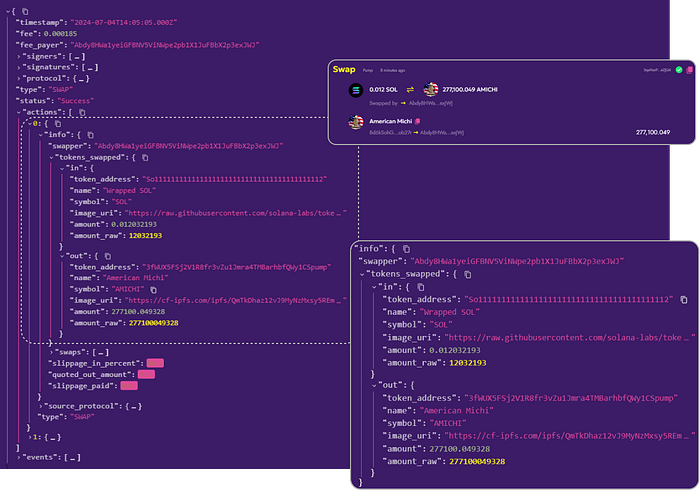
Parsed Pump.fun transactions on Solana
From this parsed data, we can obtain various pieces of information such as the tokens involved in the swap, the swapped amounts, and the swapper address. With transactions being streamed in real-time, this information can be promptly parsed and utilized in any necessary application.
For sub-millisecond latency — faster than any gRPC node can deliver — RabbitStream streams directly from Solana shreds before transaction confirmation.
Live Examples: Raydium and Pump.fun gRPC Streams
We have created two example projects on replit for you to follow along. Just add your gRPC url and access token in the secrets section to give it a spin. Request your access token on Shyft Discord now!
- Example 1— Streaming Raydium Transactions in Real-time
- Example 2— Streaming Pump.fun Transactions in Real-time
Conclusion
In this article, we’ve shown how to stream Raydium v4 transactions in real-time using SHYFT’s gRPC services. With gRPC’s speed and SHYFT’s global network, setting up real-time data streams is quick and efficient. This affordable solution is perfect for self-hosting APIs, running trading bots, and building real-time data applications. Get your API key, and start streaming today!
If you liked this article on gRPC streaming on Solana, do check out our other articles on Streaming with Rabbistream on Solana or streaming pump.fun data on Solana using Yellowstone gRPC.
We hope you have a great time building dApps with SHYFT.