A step-by-step guide to streaming new Raydium AMM V4 liquidity pool creation events on Solana using Shyft’s Yellowstone gRPC — with memcmp filtering and transaction parsing examples.
Raydium AMM V4 is one of Solana’s most active decentralized exchanges. For trading bots, arbitrage scripts, and DeFi analytics tools, detecting new liquidity pool creation the moment it happens on-chain is a critical competitive advantage.
In this guide, you’ll learn how to stream new Raydium pool creation events in real-time using Shyft’s Yellowstone gRPC by:
- Subscribing to the Raydium AMM V4 program ID (675kPX9MHTjS2zt1qfr1NYHuzeLXfQM9H24wFSUt1Mp8)
- Using memcmp filters to isolate only new pool creation transactions.
- Parsing the raw gRPC stream into readable pool data.
- Adapting the same approach for other DEXes like Meteora and Orca.
Looking for a full working example to following along with? Please refer to this replit project we have created here. Make sure you get your gRPC URL and access token from Shyft Discord here, and add it to the secrets section before executing.
Before Getting Started
To get started, we will need a few things.
Authentication: Your Shyft API Key, gRPC endpoint and gRPC token
You can get a free Shyft API Key (an auth parameter used by Shyft) from the Shyft website. You can also find your region-specific gRPC endpoint and access token on your Shyft gRPC Dashboard.
A server-side backend (like NodeJS) to receive gRPC data
As gRPC services are unsupported in web-browsers, you would need a backend application to receive gRPC data. For this example, we have used NodeJS, but any other backend server side languages such as C#, Go, Java, Kotlin, Python or PHP can also be used.
The Raydium Liquidity Pool Program ID
To listen to Raydium transactions, we have to add this address in the subscribe request: 675kPX9MHTjS2zt1qfr1NYHuzeLXfQM9H24wFSUt1Mp8
Introduction
Shyft’s geyser-powered gRPC provides streaming services for account updates, transactions, blocks and slot updates, as soon as they happen on-chain. Our plan involves integrating Shyft’s gRPC service to establish a transaction streaming pipeline for Raydium Liquidity Pool v4.
Once we get this data in our backend, we can quickly analyze it to identify transactions that create new Pools on Raydium. By using specific encoded values and empty byte arrays for filtering, we can efficiently retrieve only the important data we need. This way, we focus on liquidity pools related to SOL and Serum markets while still capturing active trading events.
Step 1: Initialize the Shyft Yellowstone gRPC Client
Shyft’s gRPC access tokens are available in their discord server. Please refer to the ‘Before Getting Started’ section for more details.
Once we obtain the access token and gRPC URL, we proceed by importing the client class from the Yellow Stone services. Initializing a new client requires two parameters: the gRPC URL and the access token. The client can be initialized as follows:
Shyft offers Dragonmouth gRPC nodes, originally developed by Triton One as part of their Yellowstone project. These nodes enable real-time data streaming from the Solana network.
To connect to these nodes using Node.js, you’ll need the @triton-one/yellowstone-grpc SDK. After installation, you can initialize a client object. This involves:
- Importing the Client Class: Import the
Clientclass from the@triton-one/yellowstone-grpcSDK. - Obtaining Credentials: Acquire your access token and the gRPC URL from Shyft.
- Initializing the Client: Use the
Clientclass to create a new client object. Provide both the access token and the gRPC URL as parameters during initialization.
The client can be initialized in the following manner.
import Client from "@triton-one/yellowstone-grpc";

const client = new Client(
  "https://grpc.us.shyft.to", //Your Region specific Shyft gRPC URL
  "hbdj-asjnf-access-token-asdh", //Shyft gRPC Access Token
  undefined,
);
For a more detailed guide on how to setup the client and streaming transactions using gRPC, feel free to checkout this article on Streaming real-time Solana Transactions.
Step 2: Enabling Live Updates — Requesting and Receiving the Stream
Shyft’s gRPC service leverages subscription streams to facilitate real-time updates from the Solana blockchain. These streams act as persistent connections, allowing your application to continuously receive updates as events occur on-chain. To set up a new subscription stream on the client created in the previous step, use the client.subscribe() method.
const stream = await client.subscribe();With the subscription stream established, it’s time to specify what data you want to receive. Shyft’s gRPC interface offers a variety of updates, including account changes, transactions, new blocks, and even slot updates. To avoid information overload, you can specify what you actually need through subscribe requests.
These subscribe requests come in different format, each with its own set of parameters and they look somewhat like this
import { CommitmentLevel } from "@triton-one/yellowstone-grpc";

const req: SubscribeRequest = {
  accounts: {},
  slots: {},
  transactions: {},
  transactionsStatus: {},
  entry: {},
  blocks: {},
  blocksMeta: {},
  accountsDataSlice: [],
  ping: undefined,
  commitment: CommitmentLevel.CONFIRMED,
};
Most of the request parameters are self-explanatory, working exactly with what they are named,
- ‘accounts’: You can subscribe to specific accounts (e.g., SOL-USDC OpenBook) by specifying this parameter and receive updates based on commitment levels (processed, confirmed, finalized).
- ‘accountDataSlice’: This field helps you to filter your gRPC stream, so that you receive only the relevant portion of streamed data. For example you are streaming accounts, for which the data size is 200bytes, but you only need 40 bytes after a certain offset. This field can help you filter those 40 bytes for every update in the stream.
- ‘transactions’ & ‘transactionsStatus’: You can receive updates on all transactions or filter them based on specific criteria (vote/failed transactions, including/excluding accounts). Programs can also be monitored using this.
- ‘slots’, ‘blocks’ & ‘blocksMeta’ : Stay informed about new blocks and slots being produced on the blockchain.
- ‘commitment’: This specifies the commit level for any update, either processed, confirmed or finalized.
In this tutorial we will be making use of AccountDataSlice. Here is a sample subscription request to receive transactions for Raydium:
const request: SubscribeRequest = {
  "slots": {},
  "accounts": {
    "raydium": {
      "account": [],
      "filters": [
        {
          "memcmp": {
            "offset": LIQUIDITY_STATE_LAYOUT_V4.offsetOf('quoteMint').toString(), // Filter for only tokens paired with SOL
            "base58": "So11111111111111111111111111111111111111112"
          }
        },
        {
          "memcmp": {
            "offset": LIQUIDITY_STATE_LAYOUT_V4.offsetOf('marketProgramId').toString(), // Filter for only Raydium markets that contain references to Serum
            "base58": "srmqPvymJeFKQ4zGQed1GFppgkRHL9kaELCbyksJtPX"
          }
        },
        {
          "memcmp": {
            "offset": LIQUIDITY_STATE_LAYOUT_V4.offsetOf('swapQuoteInAmount').toString(), // Hack to filter for only new tokens. There is probably a better way to do this
            "bytes": Uint8Array.from([0])
          }
         },
        {
          "memcmp": {
            "offset": LIQUIDITY_STATE_LAYOUT_V4.offsetOf('swapBaseOutAmount').toString(), // Hack to filter for only new tokens. There is probably a better way to do this
            "bytes": Uint8Array.from([0])
          }
        }
      ],
      "owner": ["675kPX9MHTjS2zt1qfr1NYHuzeLXfQM9H24wFSUt1Mp8"] // raydium program id to subscribe to
    }
  },
  "transactions": {},
  "blocks": {},
  "blocksMeta": {
    "block": []
  },
  "accountsDataSlice": [],
  "commitment": CommitmentLevel.PROCESSED, // Subscribe to processed blocks for the fastest updates
  entry: {},
  transactionsStatus: {}
}
In this code snippet, we are configuring a subscription to a Solana account to monitor Raydium liquidity pools with specific filters. Here’s a detailed breakdown of the configuration:
slots: This parameter is an empty object, indicating that no specific slot data is being subscribed to.accounts: This section configures the subscription to specific Solana accounts. In this case, we are focusing on the Raydium program:
I. raydium: This is the name of the account category for which we are setting up filters.
a. account: An empty array, meaning there are no specific accounts being subscribed to directly.
b. filters: This is a set of criteria to narrow down the accounts that we are interested in:
b.i. : memcmp: This filter is used to match data at specific byte offsets within the account data. The offset specifies the byte position to check, and base58 or bytes specifies the data to match, it tells the system where to look within that binary structure to find specific information. i.e. "offset":LIQUIDITY_STATE_LAYOUT_V4.offsetOf('quoteMint').toString();
c. quoteMint: Filters accounts where the quoteMint field matches a specific base58-encoded mint address (So11111111111111111111111111111111111111112). This is used to focus on tokens paired with SOL. By matching it with a base58 encoded value (like "So11111111111111111111111111111111111111112"), you’re filtering for liquidity pools that specifically pair with SOL. This ensures that you only receive data relevant to trades or liquidity involving SOL, making your analysis more focused and efficient.
d. marketProgramId: Filters accounts where the marketProgramId field matches the base58-encoded Serum program ID (srmqPvymJeFKQ4zGQed1GFppgkRHL9kaELCbyksJtPX). The base58 value (e.g., "srmqPvymJeFKQ4zGQed1GFppgkRHL9kaELCbyksJtPX") corresponds to the Serum market program. By filtering for this value, you can ensure that you’re only monitoring liquidity pools that interact with the Serum decentralized exchange, which is critical for tracking relevant trading activity and price movements.
e. swapQuoteInAmount and swapBaseOutAmount: These fields are used as a crude filter to identify new tokens by checking for accounts where these values are zero. This approach is a workaround and may not be the most efficient method for filtering new tokens.
f. owner: Specifies the owner of the accounts we are interested in. In this case, we are targeting accounts owned by the Raydium program ID (675kPX9MHTjS2zt1qfr1NYHuzeLXfQM9H24wFSUt1Mp8).
3. transactions, blocks, blocksMeta, accountsDataSlice, entry, transactionsStatus: These are set as empty objects or arrays, indicating no specific configurations or subscriptions for transaction data, blocks, or other parameters in this request.
4. commitment: This field defines the level of confirmation for the subscribed data:
I. CommitmentLevel.PROCESSED: This level ensures that you receive updates as soon as they are processed by the Solana network, offering the fastest updates but potentially less confirmation.
With the stream successfully set up, it is necessary to have a function to process the transactions received for further actions. The stream.on('data', callbackFunc()) method handles the stream, as illustrated below.
//callback function that handles the stream
 stream.on("data", async (data) => {
    try{
      if (data.account != undefined) {
       const info = await tOutPut(data);
       console.log(
        new Date(),
        ":",
        `New transaction https://translator.shyft.to/tx/${info.signature} \n`,
        JSON.stringify(info, null, 2) + "\n",
      );
    }
}catch(error){
  if(error){
    console.log(error)
  }
}
});
Step 3: Add a Reconnect Mechanism for Production
While gRPC streaming offers a reliable way to receive real-time data, unexpected network issues can still disrupt the connection. To ensure a seamless experience, you can implement a reconnect mechanism in your application. Here is an example mechanism will automatically attempt to re-establish the gRPC stream if it gets disconnected.
async function subscribeCommand(client: Client, args: SubscribeRequest) {
  while (true) {
    try {
      await handleStream(client, args); //function which handles the stream
    } catch (error) {
	    //iff the stream disconnects due to any error, this will wait for a second and restart the stream
      console.error("Stream error, restarting in 1 second...", error);
      await new Promise((resolve) => setTimeout(resolve, 1000));
    }
  }
}
For the earliest possible detection of new pool creation — before transaction confirmation —RabbitStream streams directly from Solana shreds with a 15–100ms speed advantage.
Step 4: Parse Transactions and Identify New Pool Creation
Thus we have seen Shyft’s gRPC services, you can effortlessly stream Solana transactions in real-time. Here is a raw transaction received from the gRPC:
2024-09-07T08:04:52.816Z : New transaction https://translator.shyft.to/tx/2y9VYJ944mZM2LUms5TSNH6cfSjqQMH1sde62bb2KCG6s7xXEDYV6wgCoQAa8ZSUF8AAdM19rvJ6UAnmsqYxPttM
 {
  "filters": [
    "raydium"
  ],
  "account": {
    "account": {
      "pubkey": {
        "type": "Buffer",
        "data": [
          127,
          210,
          158,
          190,
          141,
          181,
          87,
          182,
          122,
          33,
          191,
          96,
          181,
          133,
          115,
          87,
          254,
          58,
          71,
          41,
          63,
          49,
          147,
          127,
          94,
          42,
          248,
          21,
          104,
          234,
          112,
          121...
        ]
      },
      "lamports": "6124800",
      "owner": {
        "type": "Buffer",
        "data": [
          75,
          217,
          73,
          196,
          54,
          2,
          195,
          63,
          32,
          119,
          144,
          237,
          22,
          163,
          82,
          76,
          161,
          185,
          151,
          92,
          241,
          33,
          162,
          169,
          12,
          255,
          236,
          125,
          248,
          182,
          138,
          205
        ]
      },
      "executable": false,
      "rentEpoch": "18446744073709551615",
      "data": {
        "type": "Buffer",
        "data": [
          6,
          0,
          0,
          0,
          0,
          0,
          0,
          0,
          254,
          0,
          0,
          0,
          0,
          0,
          0,
          0,
          0,
          0,
          0,
          0,
          0,
          0..
        ]
      },
      "writeVersion": "1420851011205",
      "txnSignature": {
        "type": "Buffer",
        "data": [
          98,
          111,
          127,
          61,
          204,
          178,
          57,
          89,
          191,
          6,
          80,
          208,
          11,
          5,
          56,
          145,
          243,
          41,
          76,
          253,
          154,
          116,
          203,
          15,
          189,
          83,
          136,
          227,
          86,
          200,
          119,
          38,
          210,
          69,
          229,
          210,
          238,
          115,
          14...
        ]
      }
    },
    "slot": "288313982",
    "isStartup": false
  }
}
Compared to traditional RPC responses, gRPC transaction streams offer similar data with a few additional fields. A few relevant additional fields include, isVote to identify vote transactions, message headers detailing signature and signer info. The response also denotes if it is a versioned transaction or not, and it also has provisions for block, ping, and entry.
To convert this transaction received from gRPC to a traditional RPC like transactions, we use the following utility function created by Shyft.
import { TransactionFormatter } from "./utils/transaction-formatter";

const TXN_FORMATTER = new TransactionFormatter();
const txn = TXN_FORMATTER.formTransactionFromJson(
    data.transaction,
    Date.now(),
);
This function mirrors traditional Solana’s getTransaction in terms of response by returning slot, version, blocktime, meta, and transactions, making it easy to integrate with existing Solana applications.
The Following Steps — Spotting New Raydium Pools
The next step involves identifying transactions that create new pools on Raydium. Whenever a new pool is created in Raydium, a specific transaction containing the memcmp instruction is executed on the blockchain. Since we’re already streaming Raydium-related transactions in real-time, we have access to all transactions related to Raydium protocol.
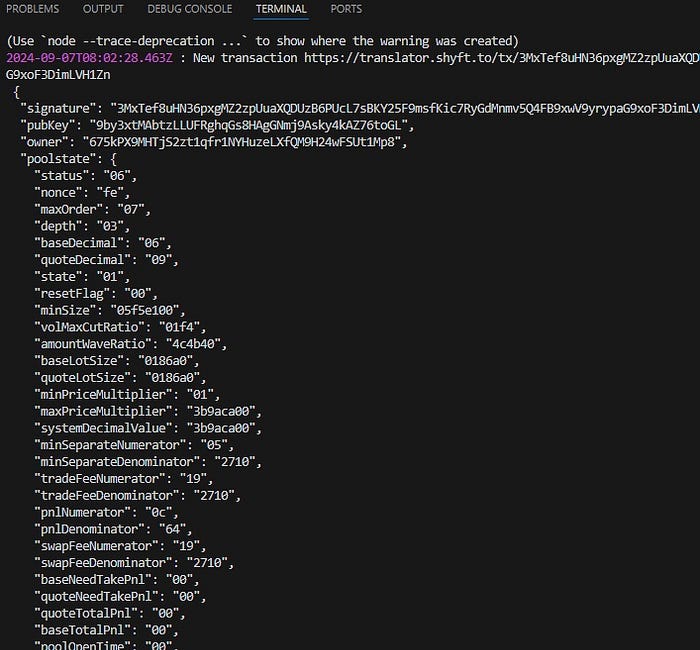
However, we need to analyze these raw transactions received from the gRPC stream to identify the ones containing the memcmp instructions, and it is only possible after parsing the transactions. We have used Shyft’s transaction parsers to parse the raw Raydium transaction received from gRPC.
Press enter or click to view image in full size
Parsed Raydium Updates
After we break down the transaction (parsing), we’re left with a list of “filters”, which are essentially operations which are performed if the transaction is executed. Each filter has details like amount used in swaps(set at zero values) , the program it’s connected to (like Raydium), and the accounts involved(quoteMint, baseMint). Our job is to sift utilize accountDataSlice and see if there’s a specific one with the memcmp objects. If we find one of these, then that transaction is creating a new pool!
Once you’ve detected a new pool, you’ll likely want to stream live trades on it — see how to stream and parse Raydium AMM transactions using the same gRPC setup.
How to Adapt This for Meteora, Orca, and Other DEXes
The beauty of this pool detection method lies in its adaptability! It can be applied to other decentralized exchanges (DEXes) that utilize similar create pool (initialize) instructions for pool creation. Some examples include Meteora, Orca, and Jupiter.
The core steps remain largely the same, but with two key adjustments:
- Program ID Replacement: During the subscription request setup, you’ll need to swap out the Raydium program ID with the specific program ID of the target DEX (e.g., Meteora, Orca, Jupiter). This ensures you’re subscribing to transactions associated with that particular DEX.
Press enter or click to view image in full size
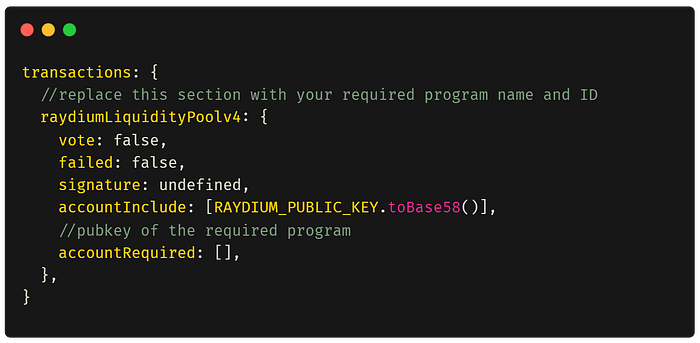
- Respective Transaction Parsers: Instead of relying on Shyft’s Raydium parsers, you’ll need to utilize the dedicated transaction parsers designed for the specific DEX you’re interested in. These parsers are essentially “code translators” optimized to understand the structure and instructions within that DEX’s transactions, and they are all available with Shyft.
By implementing these adjustments, you can effectively identify new pool creation events across various DEXes on the Solana blockchain. This empowers you to stay ahead of the curve and explore diverse pool opportunities within the DeFi ecosystem.
That’s pretty much everything about this article. In case you want to explore more about gRPCs, feel free to checkout how to setup gRPC streaming on Solana, or Streaming moonshot transactions on Solana. A big thank you for the read time, and do stay tuned for more Defi dev insights!
If you want the entire working example, here is a git repository we have created for you to try out. Make sure you add your region-specific gRPC url, and access token to the “secrets” section before trying out.